Apr 30, 2025

10 Practical Tips to Set Up a Comfortable and Productive Home Learning Space for Kids

10 Practical Tips to Set Up a Comfortable and Productive Home Learning Space for Kids image

In today’s digital age, children are not only learning at school but also through various online platforms from the comfort of home. That’s why setting up a home learning space for kids that is both comfortable and productive has become increasingly important. A well-organized learning environment supports better focus, enhances motivation, and encourages independent study habits from an early age.

Here are ten simple yet effective tips to help parents create an ideal home learning space that supports both comfort and academic success.

10 Practical Tips to Set Up a Comfortable and Productive Home Learning Space for Kids

1. Choose a Quiet Spot with Minimal Distractions

home learning space for kids

Start by picking a location that isn’t heavily trafficked throughout the day. Ideally, a home learning space for kids should be away from TVs, the kitchen, or play areas. If you don’t have a dedicated room, convert a quiet corner of the bedroom or living room into a learning zone.

Use a bookshelf or lightweight divider to create a clear separation between study time and leisure time.

2. Ensure Good Lighting

Lighting has a direct impact on mood and focus. Make sure the home learning space for kids has access to natural light during the day. For evening sessions, provide a desk lamp with bright but soft white lighting. Avoid dim lights, as they can cause drowsiness and reduce attention.

3. Provide Ergonomic Furniture

A comfortable setup goes a long way. Use a chair and desk that match your child’s height to encourage proper posture. Add cushions or a footrest if needed, so your child can sit comfortably for longer study sessions.

4. Minimize Visual and Audio Distractions

Overly bright or busy decor can be distracting in home learning space for kids. Stick to neutral or calming colors for the walls and furniture. Keep toys and unrelated devices out of reach during study hours.

If noise from outside interrupts your child’s focus, consider using noise-cancelling headphones, especially during online classes.

5. Keep All Learning Materials Within Reach

Equip the space with all the essentials: stationery, books, a laptop or tablet, headphones, and a reliable internet connection. Having everything nearby prevents unnecessary movement and keeps the child focused.

Use storage bins or small shelves to keep the desk tidy and clutter-free.

6. Display a Daily Schedule

Help your child develop a routine by creating a visual schedule. Post it on the wall near their desk using colorful charts or illustrations. The schedule can include study time, breaks, meals, and creative activities.

Visual structure supports time management and builds responsibility.

7. Involve Your Child in the Setup

Let your child have a say in how the space looks. Allow them to choose the colors, arrange the desk, or decorate with their favorite items. When kids feel ownership over their home learning space, they are more likely to use it enthusiastically and keep it tidy.

8. Ensure Good Air Circulation and Room Temperature

A cool, fresh room helps maintain energy and concentration. Open windows regularly or use a fan or air conditioner if needed. Scent can also influence mood — try light, calming scents like lavender to create a relaxed environment.

9. Match the Setup to Your Child’s Digital Learning Needs
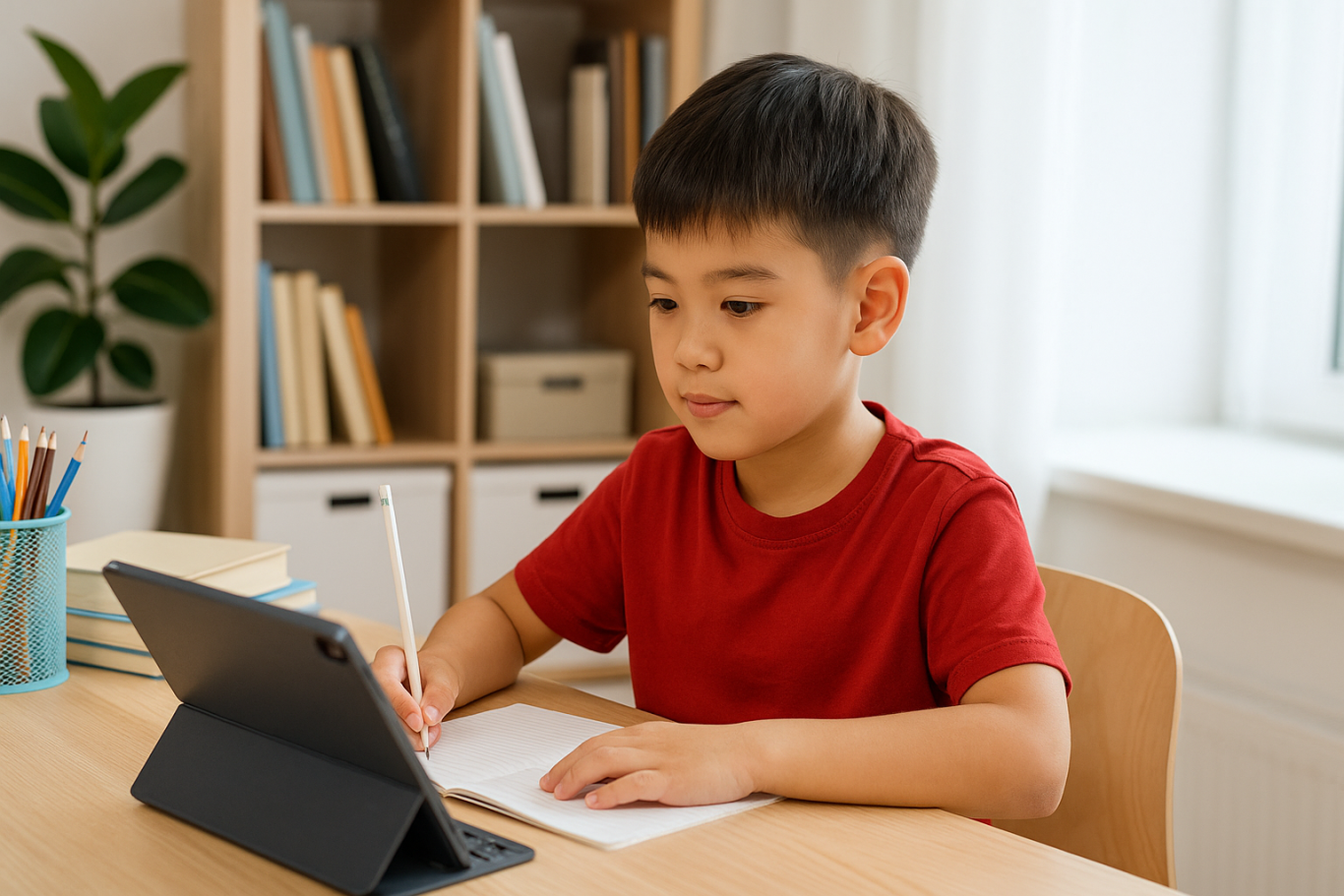
If your child is involved in digital learning, make sure the equipment works smoothly. Check the laptop or tablet, webcam, microphone, and internet connection before class begins. Also, make sure their chair and desk setup supports good posture for screen-based learning.

10. Add Motivational Personal Touches

Showcase your child’s artwork, awards, or inspiring quotes on the wall. Personal touches can boost confidence and make the space feel more welcoming and meaningful to them.

Maximize Your Child’s Home Learning Space with the Right Learning Program

Creating a home learning space for kids is a strong start, but it becomes truly effective when paired with the right learning content. Timedoor Academy offers a wide range of interactive online classes to help children grow academically and creatively — all from their home learning space.

With subjects like coding, robotics, math, and digital creativity, your child can explore their interests in a fun and structured way.

Ingin tahu detail program? Image

Ingin tahu detail program?

Sign up for a free trial class at Timedoor Academy today and give your child the opportunity to build skills for the future while learning comfortably at home.


Keep Reading

Why Coding for Kids Is Ideal Starting at Age 5
Many parents wonder if young children are ready to learn programming. The answer is absolutely yes, and it is highly encouraged. In recent years, coding for kids as young as five has become increasingly popular. It has been shown to support the development of logical thinking, creativity, and confidence from an early age. Learning to code doesn’t mean children have to type lines of complex code like adults. In fact, the methods used for teaching coding for kids are designed to be fun and visual, often using colorful blocks or interactive games. This makes the learning process feel more like play than work. 1. Age 5 Is a Golden Window for Brain Development Research shows that age 5 is a critical period for brain development. At this stage, children rapidly build their ability to think, absorb information, and recognize patterns. Coding for kids at age 5 takes advantage of this window to introduce logical and systematic thinking. As they solve simple coding challenges, children begin to develop strong problem-solving habits without even realizing it. 2. Builds Focus and Concentration One of the biggest challenges for parents is helping children stay focused during learning. Coding engages children in logical sequences and hands-on tasks like programming a character to move. These activities gradually strengthen concentration. Coding for kids at this age can be an effective way to improve attention span through playful and interactive tasks. 3. Enhances Communication and Collaboration Skills Coding isn’t always a solo activity. Many programs offering coding for kids at age 5 are built around collaboration. Children work in pairs or groups, share ideas, and express their thoughts. These moments naturally boost communication and teamwork, helping kids build social skills early on that will benefit them for years to come. 4. Introduces Technology in a Positive Way Today’s children are no strangers to gadgets and the internet. Instead of completely restricting screen time, parents can guide their kids to use technology for educational purposes. Coding for kids is a smart way to shift them from passive digital consumption to active understanding of how tech works. It fosters digital creativity and responsibility from a young age. 5. Opens Up Future Career Opportunities The future job market will be deeply rooted in technology. By introducing programming concepts early, parents give their children a head start. Coding for kids helps them develop not only technical skills, but also essential soft skills like perseverance, logical reasoning, and adaptability, all of which are vital for future success. Try a Free Coding Class at Timedoor Academy If you're curious to see the benefits of coding for kids firsthand, Timedoor Academy offers a free trial class you can join from home. With a project-based curriculum and engaging visual materials, children are encouraged to explore technology in a way that’s fun and age-appropriate. Timedoor’s curriculum is specially designed for young learners. Guided by professional mentors, children learn through play while building critical thinking skills and confidence. Don’t miss the chance to introduce your child to a positive and educational tech environment.
Amazing Benefits of Robotics Course for Elementary Students Every Parent Should Know
Technology is advancing rapidly year by year. Children who are currently in elementary school will face a future filled with innovation, automation, and artificial intelligence. Therefore, equipping them with relevant skills from an early age is crucial. One of the best ways to prepare them is through a robotics course for elementary students. With engaging and practical methods, children can learn to understand technology while also developing their creativity. What Is a Robotics Course? A robotics course is a learning program that introduces children to the process of designing, assembling, and programming simple robots. Through a robotics course for elementary students, children can explore the basic principles of science, technology, engineering, and mathematics, often referred to as STEM. These activities are designed to be fun and interactive, so children feel like they are playing while actually building valuable skills. The Benefits of Robotics Course for Children Many parents are choosing a robotics course for elementary students because of its wide-ranging benefits. First, children learn to think logically and systematically. Each robot component must be installed in the correct order, helping them understand cause-and-effect relationships. Second, they develop problem-solving skills. When the robot does not work as expected, children are encouraged to find creative solutions. Third, the course teaches patience and perseverance since building a robot requires time and dedication. Boosting Creativity and Imagination Beyond technical aspects, a robotics course for elementary students also nurtures creativity. Children are not limited to simply following instructions, but are encouraged to design and test their own ideas. For instance, they can build robots that walk, light up, or even play simple music. This process shows children that technology is not only something to use, but also something they can create themselves. Developing Social Skills Many robotics course for elementary students programs are conducted in groups. This allows children to collaborate with peers, exchange ideas, and solve challenges together. Learning how to work in a team will benefit them not only in school, but also in their personal and professional lives later on. Building a Strong Foundation for the Future In today’s world, technology skills are key to future success. By taking a robotics course for elementary students, children are not only prepared for academic challenges but also given a strong foundation for careers in technology-related fields. Areas such as artificial intelligence, data science, and mechanical engineering will be easier to grasp because they have already been introduced to the basics of robotics at a young age. The Role of Parents in Supporting Learning Parental support plays a major role in a child’s learning journey. Celebrating small achievements, assisting them during robot-building sessions, or simply listening to their stories about class experiences can boost their confidence. With such support, every session in a robotics course for elementary students will become even more meaningful. Why Choose Timedoor Academy? Timedoor Academy offers a robotics program tailored specifically for elementary school students. Its curriculum goes beyond technical knowledge by also focusing on creative thinking and collaboration. Each class is guided by experienced mentors who understand how to introduce technology to young learners effectively. With a fun and interactive environment, children will be excited to join every session. Enroll Your Child at Timedoor Academy! If you want your child to develop future-ready skills, now is the perfect time to take action. Register them for a Free Trial at Timedoor Academy and discover how robotics courses can transform curiosity into real abilities. Click the registration button today and give your child the best opportunity to grow and succeed.
<strong>5 Top Recommendations for Saving Accounts for Kids: Safe and Educational Options</strong>
5 Top Recommendations for Saving Accounts for Kids: Safe and Educational Options
Teaching children to save from an early age is a smart move to help them build healthy financial habits. One of the most effective steps parents can take is to open saving accounts for kids with a trusted bank. Through these special products, parents can introduce financial concepts, help children manage their allowance, and encourage a sense of responsibility about money management right from the start. Today, many banks around the world offer saving accounts for kids that are both attractive and educational. Parents can easily keep an eye on the balance and guide their children toward reaching their savings goals, whether it’s for a new toy, a book, or something they need for school. However, choosing saving accounts for kids should not be done on a whim. There are several factors to consider, including minimum deposit requirements, fees, as well as features like debit cards, mobile banking apps, and educational resources. Here are five of the best saving accounts for kids from globally recognized banks that are worth considering this year. 1. HSBC MySavings Youth Account The HSBC MySavings Youth Account is a popular choice among saving accounts for kids. Designed for children and teens (typically ages 7 to 17, though age requirements vary by country), this account helps kids understand banking basics and offers competitive interest rates with parental oversight. Highlights: No monthly fees Low minimum deposit Optional debit card with parental approval Online banking access for both parents and kids HSBC’s strong global network and easy-to-use digital services make it a reliable choice for families everywhere. 2. Santander 123 Mini Account The Santander 123 Mini Account is an excellent example of saving accounts for kids that are accessible internationally, especially in the UK and Spain. Suitable for children up to 17 years old, this account focuses on developing smart savings habits through a simple interface. Highlights: No monthly maintenance fees No minimum deposit Optional contactless debit card for older kids Online and mobile banking for parents and children This account lets parents supervise transactions while helping children learn the importance of saving and budgeting. 3. Capital One Kids Savings Account For families in the United States, the Capital One Kids Savings Account is an easy and fee-free way to get children started with saving accounts for kids. This account offers robust parental controls and is designed to be managed entirely online. Highlights: No monthly or annual fees No minimum balance requirement Competitive interest rates User-friendly mobile banking app Capital One also provides helpful resources for parents and kids to learn about money management together. 4. Revolut <18 (Under 18 Account) Revolut <18 is a digital solution for saving accounts for kids, available across Europe, the UK, Australia, Singapore, and other regions. Designed for children ages 6 to 17, it provides a digital wallet and a prepaid debit card under the supervision of a parent. Highlights: Instant app-based notifications Parental controls and spending limits Prepaid debit card for safe transactions Budgeting tools and goal setting Revolut <18 is ideal for families who want a modern, digital approach to teaching kids about saving and spending safely. 5. Chase First Banking Chase First Banking is one of the latest saving accounts for kids in the United States, created in partnership with Greenlight. It combines checking and savings features with strong parental controls and educational tools. Highlights: No monthly service fees Customizable saving, spending, and earning features Parental approval for key transactions Access to a large network of ATMs and branches Chase’s mobile app is intuitive and helps children learn to set goals, manage money, and track their progress in real time. Tips for Choosing the Right Saving Accounts for Kids To maximize the benefits, here are some useful tips for selecting saving accounts for kids: Choose an account that suits your child’s age and offers strong parental oversight. Look for low fees, reasonable minimum deposits, and attractive interest rates. Consider extra features such as mobile banking, debit cards, and educational content. Prefer banks with programs that reward good saving habits and offer financial education. Involve your child in the process of opening the account to build a sense of responsibility and motivation. Saving, Financial Literacy, and Digital Skills for the Future Introducing saving accounts for kids is not just about putting money away; it’s about building a foundation for lifelong financial literacy. In our increasingly digital world, it’s also wise to introduce children to essential digital skills like coding, preparing them for tomorrow’s challenges. If you want your child to become both financially responsible and tech-savvy, sign them up for a free trial coding class at Timedoor Academy. Kids can learn money management while developing logical thinking and creativity, helping them grow into a wise and innovative generation.
float button