Apr 28, 2025

How Technology Boosts Creativity for Kids

How Technology Boosts Creativity for Kids image

In today’s digital age, technology plays a significant role in shaping children’s lives, offering them not only entertainment but also endless opportunities to enhance their creativity. How technology boosts creativity for kids is not just about playing games or watching videos; it’s about engaging with tools that encourage children to explore new ideas, express themselves through various forms of art, and solve complex problems in innovative ways. In this article, we’ll dive into the many ways how technology boosts creativity for kids, helping parents and educators harness the power of technology for creative development.

1. Digital Tools That Boost Creativity for Kids

how technology boosts creativity for kids

Technology offers a vast array of digital tools designed to stimulate creativity in children. Drawing apps like Procreate or Tayasui Sketches, for example, allow kids to create beautiful artworks on tablets, pushing their imagination and skills. Music production software, such as GarageBand, is another fantastic tool to help children explore their musical creativity by composing songs and learning about sound design.

These tools don’t just teach technical skills; they encourage kids to think creatively. The immediate feedback and flexibility offered by these apps allow children to experiment with different styles and techniques, making it a fun and educational way how technology boosts creativity for kids.

2. Problem-Solving and Critical Thinking

One of the most impactful ways how technology boosts creativity for kids is by enhancing their problem-solving and critical thinking abilities. Educational games and apps that challenge children to solve puzzles, plan strategies, and make decisions help develop their cognitive skills. Apps like Scratch or Tynker, which teach coding and logic, are excellent examples of how technology boosts creativity for kids.

By engaging with these platforms, children not only learn to code but also learn to think critically, test solutions, and refine their ideas. This helps them become creative problem-solvers who are capable of thinking outside the box, which is an essential skill for both academic success and life in general.

3. Access to a Wealth of Creative Learning Resources

how technology boosts creativity for kids

The internet is a treasure trove of creative learning resources that can help how technology boosts creativity for kids. Platforms like YouTube, TED-Ed, and Khan Academy provide a wide variety of content that can spark children’s imaginations. From DIY craft tutorials to science experiments, there is no shortage of material to engage kids and fuel their creativity.

Moreover, eBooks and audiobooks offer children new ways to experience stories that stimulate their imagination. These resources allow kids to engage with the arts, explore new concepts, and learn new skills in creative and interactive ways.

4. Collaborative Creativity and Social Interaction

Technology also offers unique opportunities for kids to collaborate on creative projects with others. Online platforms and apps designed for group work allow children to share ideas, co-create, and provide feedback to one another, fostering both creativity and social skills. By working together, kids not only boost creativity but also learn how to communicate effectively, manage team dynamics, and develop empathy.

For instance, children can participate in group art projects, write collaborative stories, or join virtual hackathons. These shared creative experiences are a great way to help children enhance their creativity while also developing valuable interpersonal skills.

5. Digital Storytelling for Creative Expression

Digital storytelling is another powerful way how technology boosts creativity for kids. With easy-to-use platforms like Storybird, Adobe Spark, and even Instagram, children can write, illustrate, and share their stories in engaging ways. These platforms allow kids to take control of their narratives, helping them express their thoughts, ideas, and emotions creatively.

Storytelling is not only a fun way to engage with creativity but also a valuable skill that supports literacy, critical thinking, and emotional development. By using digital tools to tell their stories, children can learn how to organize their ideas, use technology to enhance their creations, and communicate their thoughts in new and innovative ways.

6. Immersive Technologies: Virtual and Augmented Reality
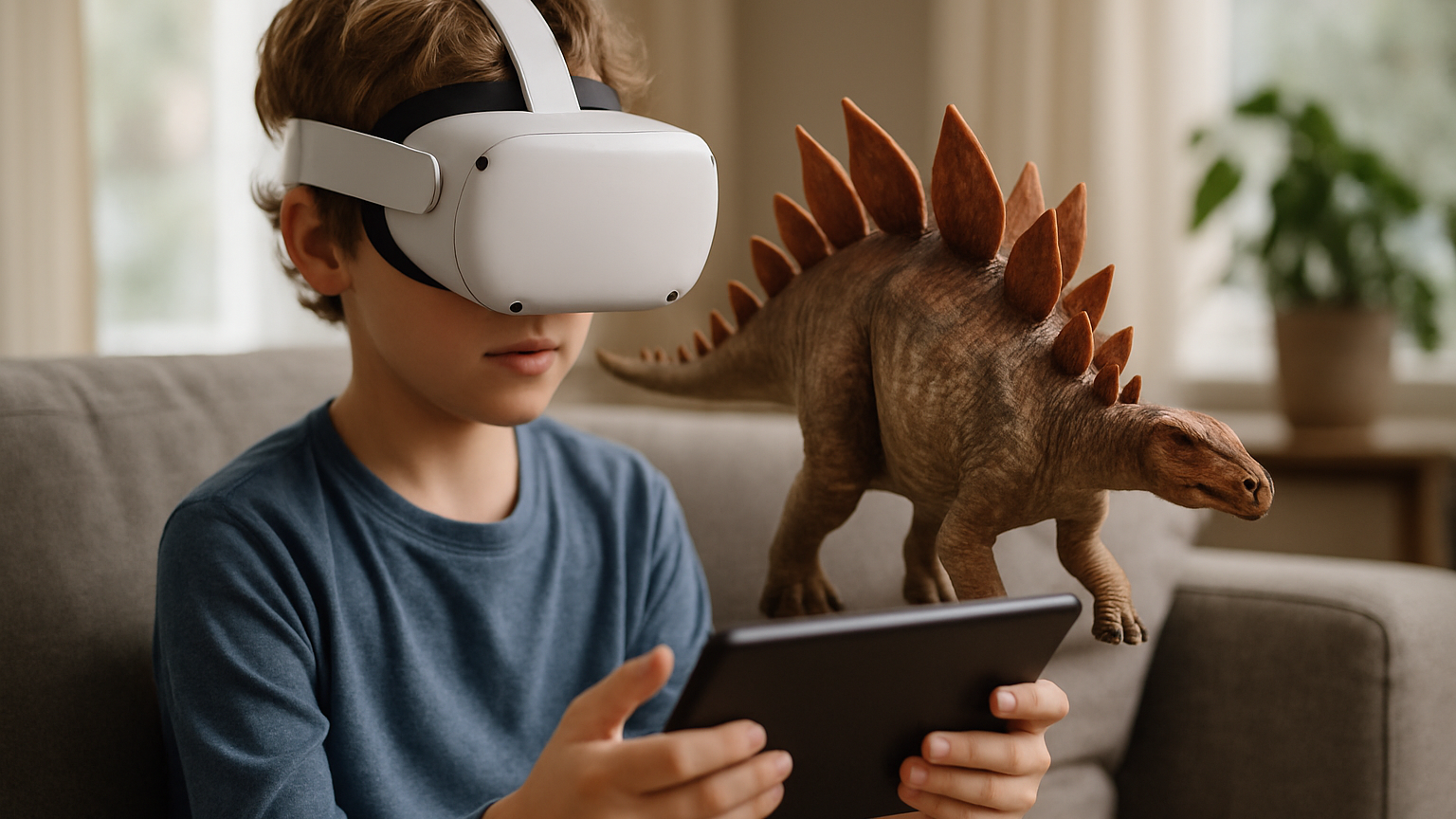
Virtual Reality (VR) and Augmented Reality (AR) technologies are increasingly being used to enhance creativity for kids. These immersive technologies provide children with the opportunity to engage with creative environments in ways that are not possible in the real world. With VR and AR, children can design virtual spaces, explore interactive 3D models, and engage in hands-on creative activities.

For example, using VR headsets, children can participate in virtual learning experiences that incorporate art, design, and creativity. They can create 3D models, design virtual sculptures, or explore complex architectural structures. AR apps like Quiver bring children’s drawings to life, allowing them to see their artwork come to life in augmented spaces. These tools give kids a whole new world to explore, further showing how technology boosts creativity for kids.

7. Technology as a Gateway to STEM Creativity

Another way how technology boosts creativity for kids is by inspiring them to pursue STEM (Science, Technology, Engineering, and Mathematics) fields, where creativity is a crucial component. Coding platforms, robotics kits, and 3D printing tools all encourage kids to create, innovate, and design in the realms of engineering and technology.

Tools like LEGO Mindstorms or robotics kits allow kids to build and program their own creations, providing them with hands-on experience in both technology and design. These activities encourage kids to think creatively about how to solve problems, design solutions, and bring their ideas to life.

How Technology Boosts Creativity for Kids in Countless Ways

Ingin tahu detail program? Image

Ingin tahu detail program?

Incorporating technology into your child’s life can have a profound impact on their creative development. From digital art and music tools to coding apps and immersive experiences, technology offers a vast range of opportunities for kids to explore, create, and learn. By using these tools, parents and educators can help nurture creativity, problem-solving skills, and innovation in children, setting them up for future success.

At Timedoor Academy, we provide various online resources and learning tools designed to help your child develop their creativity through technology. Whether it’s interactive coding classes, virtual workshops, or personalized learning materials, we’re here to support your child’s creative journey. Start a free trial today and explore how technology can boost creativity for kids in exciting and engaging ways!

Keep Reading

7 Powerful Secrets to Make Children Excited About Learning Technology
In today’s fast-paced digital era, understanding technology has become one of the most essential skills for kids. However, many parents are still unsure about how to make kids interested in learning technology. Most kids prefer playing games on their phones or watching videos for entertainment rather than using technology for something educational. In fact, when used correctly, technology can be a bridge toward a bright future. kids who are familiar with technology from an early age have greater opportunities to develop creativity, logical thinking, and problem-solving skills. Timedoor Academy understands this challenge and is committed to helping parents find the best approach to make their kids love the world of technology in a positive and enjoyable way. Let us explore seven powerful secrets that will help you discover how to make kids interested in learning technology naturally and effectively. 1. Start with What Your Child Loves The first step in finding how to make kids interested in learning technology is to identify what your child enjoys the most. For instance, if your child loves drawing, introduce them to simple digital design apps. If they love playing games, invite them to learn how to create their own games. When learning is connected to their personal interests, kids are more likely to understand and stay engaged. They will see technology not as a rigid subject but as a tool for creativity and self-expression. 2. Make Learning Interactive and Meaningful kids are naturally drawn to interactive activities. They love to participate and see results from their own efforts. Therefore, one of the best ways on how to make children interested in learning technology is by providing fun and hands-on experiences. At Timedoor Academy, each lesson is designed to be engaging through activities like creating animations, designing websites, or building simple educational games. These experiences help kids understand technology in a visual and contextual way rather than only through theory. When kids can see their animation move or their program run successfully, their excitement and curiosity grow naturally. 3. Create a Supportive Learning Environment A supportive environment plays a key role in sparking a child’s interest. If parents limit technology use without clear guidance, kids might see technology as something negative. However, when the environment encourages exploration, they become more confident to try new things. One effective method of how to make kids interested in learning technology is to create a positive learning space. Parents can schedule a special time to learn together, ask about what their child is discovering, or even try out coding lessons alongside them. When kids feel valued and supported, their motivation to learn will rise significantly. 4. Introduce Technology as a Creative Tool kids often see technology only as a form of entertainment. In reality, technology holds incredible potential for creating meaningful works. To truly discover how to make kids interested in learning technology, show them that technology can be used to create something valuable. For example, they can make digital comics, design game characters, or write interactive stories using beginner-friendly programming tools. When kids realize that they can produce something original and exciting through technology, their curiosity will naturally grow stronger. 5. Show Inspiring Role Models in Technology Inspiration can come from real people who have made an impact in the world of technology. Tell your kids stories about people like Mark Zuckerberg, Elon Musk, or young Indonesian developers who have created digital innovations. This approach can be one of the best examples of how to make kids interested in learning technology because it helps them see real-life success stories. Kids will understand that technology is not limited to adults or professionals; it is a field open to anyone with passion and creativity. Through these stories, kids can be motivated to dream big and work toward their own goals in the tech world. 6. Use the Right Learning Platform Not all learning platforms are suitable for kids . Some are too technical, while others may lack meaningful challenges. That is why choosing the right educational platform is crucial. Timedoor Academy provides the perfect solution for parents looking for how to make kids interested in learning technology in a fun and age-appropriate way. Here, kids learn coding and technology through project-based lessons that encourage creativity, logical thinking, and collaboration. With interactive classes and friendly mentors, kids will discover that learning technology is not difficult but actually exciting and rewarding. 7. Celebrate Every Achievement Even small accomplishments deserve recognition. One of the most effective approaches to how to make kids interested in learning technology is by celebrating every milestone. When your child finishes their first coding project or creates a simple app, express your appreciation and excitement. These positive reinforcements help them feel proud of their progress and eager to continue learning. As a result, learning will no longer feel like a chore but an enjoyable and fulfilling adventure. The Role of Parents in Nurturing Tech Interest Parents play a crucial role in supporting and guiding their kids as they explore technology. Emotional support and shared curiosity can make the learning process more meaningful. Be your child’s learning companion. Listen to their stories, help them solve challenges, and avoid judging mistakes. By doing so, you strengthen your bond and boost your child’s confidence. You do not have to be a tech expert to support your child. Showing genuine enthusiasm and encouragement is often enough to make a lasting impact on their learning journey. Register Your Kid Now! Encouraging kids to learn technology may seem challenging at first, but it is definitely possible. By applying these principles of how to make kids interested in learning technology, parents can help their kids discover the fun and creative side of the digital world. Kids who learn to love technology from an early age will grow into creators, not just consumers. They will be better prepared to face future challenges with creativity, confidence, and problem-solving skills.Would you like your child to learn technology in a fun and inspiring way? Register now for a Free Trial Class at Timedoor Academy! Let your child experience interactive learning that builds creativity, logic, and curiosity about technology from an early age.
<strong>The Best Sports for Children Ages 3–17</strong>
The Best Sports for Children Ages 3–17
In today’s modern era, one of the biggest challenges for parents is making sure their children stay physically active amid the dominance of gadgets and digital activities. Many children prefer playing games at home rather than running or playing outdoors. In reality, choosing the best sports for children is very important to support their growth, health, and happiness. Through the right physical activities, children can develop healthy habits that last into adulthood. Every child has different interests and abilities. That’s why it is important for parents to understand what types of sports are best for their child, based on age, interest, and health conditions. By introducing physical activity from an early age, children will get to know their bodies, learn teamwork, and build self-confidence. Recommended Sports for Children by Age To maximize the benefits, here are some recommendations for the best sports for children, grouped by age: Ages 3–6:At this stage, children need simple and fun physical activities. Some of the best sports for young children include playing ball, riding a tricycle, swimming, gymnastics, and dancing. Games like hide and seek or jumping rope are also great for developing gross motor skills. Ages 7–12:Children can start joining more structured and competitive sports. Recommended sports for this age group include soccer, basketball, badminton, athletics, martial arts, and swimming. At this age, children also begin to learn teamwork and sportsmanship. Teenagers:As they enter their teenage years, children can choose sports that match their interests and talents, whether in teams or individually. They can also try more specific sports such as volleyball, table tennis, pencak silat, or archery. Teenagers are usually more motivated if sports are done together with friends. Tips to Keep Children Excited About Sports To help children stay enthusiastic and consistent about sports, parents can try these tips: Make sports a family routine, such as exercising together every weekend. Give children the opportunity to try various types of sports until they find what they enjoy most. Avoid comparing your child’s abilities with others; focus on their progress and efforts. Offer praise and support for every effort and achievement. Keep the sports environment fun, so that sports never feel like a burden or punishment. Balancing Sports and Digital Activities Besides introducing the best sports for children, it is also important to teach children how to manage their time between physical and digital activities. In the technology era, it’s true that children need to become familiar with the digital world, but physical health should always be a priority. Parents can create a daily schedule that balances study time, screen time, and physical exercise. This will help build healthy habits and prevent children from becoming too attached to their devices. Developing Children’s Potential Through Sports and Coding Nurturing a child’s potential goes beyond just finding the best sports for children. It also involves introducing them to 21st-century skills such as coding. Balancing a healthy body with an active mind is essential in this digital age. Coding trains children to think logically, creatively, and to solve problems, while sports help them develop discipline and self-confidence. Parents can blend physical and digital activities so that children can grow optimally, both physically and mentally. Try a Free Trial Coding Class at Timedoor Academy To help your child be even more prepared for future challenges, encourage them to join a free trial coding class at Timedoor Academy. In this class, children learn coding in an interactive and creative way, guided by professional mentors. Make your child’s screen time more meaningful with educational digital activities, without neglecting the importance of finding the best sports for children. Visit our website or social media pages, Timedoor Academy, to register for a free trial coding class that can be attended online from home. Finding the best sports for children does take time, but the benefits are enormous for their future. Active support and involvement from parents is essential so children can grow up healthy, happy, and confident to face the modern world.
9 Key Differences Between the 2013 Curriculum and the Merdeka Curriculum Today (2025 Update)
The differences between the 2013 curriculum and the Merdeka curriculum today have become an essential topic for parents to understand. This shift in educational approach is more than just a name change. It directly affects how children learn in school. With the right understanding, parents can better support their children’s learning process at home. The 2013 curriculum has been used for over a decade. However, ongoing evaluations showed a need for a more flexible and student-centered approach. This led to the introduction of the Merdeka curriculum as a major refresh to the national education system. So, what are the real differences between the 2013 curriculum and the Merdeka curriculum today? Below are nine key differences that parents need to know and how they impact children's education. 1. Curriculum Goals The 2013 curriculum aims to balance character, knowledge, and skills. In contrast, the Merdeka curriculum focuses more on developing each student's unique potential based on their interests and talents. This is one of the main differences between the 2013 curriculum and the Merdeka curriculum today in terms of how educational goals are designed and delivered in the classroom. 2. Learning Structure In the 2013 curriculum, all learning content is determined centrally, leaving teachers with limited flexibility. The Merdeka curriculum gives schools more freedom to adapt the structure based on local context and student needs. This flexibility is one of the most appreciated differences between the 2013 curriculum and the Merdeka curriculum today. 3. Learning Approach The 2013 curriculum uses a scientific approach that involves observation, questioning, data collection, analysis, and communication. Meanwhile, the Merdeka curriculum adopts a differentiated approach, allowing teachers to adjust teaching methods based on each student’s learning style and needs. 4. Lesson Content Another clear difference between the 2013 curriculum and the Merdeka curriculum today is the amount of learning material. The Merdeka curriculum simplifies content so students aren’t overwhelmed. It focuses on mastering key concepts instead of covering a large volume of topics, allowing for deeper understanding. 5. Assessment Method The 2013 curriculum relies heavily on administrative and quantitative assessments, which many teachers find complex and time-consuming. On the other hand, the Merdeka curriculum promotes formative assessments that help track a student’s progress and improve the learning process. 6. Role of Teachers Teachers in the 2013 curriculum function mainly as content deliverers. In the Merdeka curriculum, they take on the role of facilitators, guiding students through their learning journey. This shift in teaching roles is another major difference between the 2013 curriculum and the Merdeka curriculum today, reflecting a more student-centered learning experience. 7. Pancasila Student Profile Projects (P5) The 2013 curriculum didn’t include thematic projects. The Merdeka curriculum introduces P5 activities that help build student character through relevant themes like collaboration, creativity, and global diversity. This is one of the most visible differences between the 2013 curriculum and the Merdeka curriculum today in daily school activities. 8. Flexibility in Time and Learning Activities The 2013 curriculum tends to have rigid and packed schedules. In contrast, the Merdeka curriculum allows schools to organize learning time more flexibly. Lessons can happen outside the classroom through experiments, discussions, or even community-based learning. 9. Readiness for the Future The Merdeka curriculum is designed to meet 21st-century demands. It emphasizes critical thinking, communication, collaboration, and digital literacy. One of the most forward-looking differences between the 2013 curriculum and the Merdeka curriculum today is its focus on preparing students for technological and societal changes. The Role of Parents in the Merdeka Curriculum Era Parents are not just supporters but active partners in the Merdeka curriculum. Children need consistent support and involvement from home. One meaningful way to align with the spirit of this curriculum is by introducing your child to positive, skill-based activities like learning coding. Try a Free Coding Class at Timedoor Academy Timedoor Academy offers free trial coding classes specifically designed for kids based on their age and interests. These classes go beyond teaching technology. They help build logical thinking, creativity, and self-confidence. Each lesson is project-based, perfectly in line with the Merdeka curriculum. Kids will create games, animations, or basic apps while developing problem-solving skills and collaboration. With the support of experienced mentors, learning becomes fun, interactive, and meaningful. Let your child experience the joy of coding and build a stronger foundation for the future starting today.
float button