Jun 25, 2024

How Should We Manage Gadget Addiction in Children?

How Should We Manage Gadget Addiction in Children? image

In this digital era, gadget addiction in children has become a major concern for parents. Excessive digital use can negatively impact a child’s physical, emotional, and social development. A notable study in Bangladesh identified a significant relationship between high gadget addiction and poor cognitive function among children. This research also indicated certain factors, including demographic and family dynamics.  However, parents should not worry too much as gadget addiction can be controlled. Before discussing ways to control gadget addiction, parents must first understand the causes of gadget addiction in children.


Causes of Gadget Addiction in Children


Attractive Digital Content

Kids Playing Game

The presence of applications, video games, and social media keeps children constantly engaged due to their attractive features. Passive engagement with entertainment through digital devices can have significant disadvantages and contribute to the development of gadget addiction in children. When children’s interactions with technology are primarily focused on passive consumption of content, rather than active learning or creative activities, it increases the risk of them becoming overly dependent on and addicted to their devices.

Furthermore, social media can make children feel valued and acknowledged through likes and comments, which can lead to addiction to validation. The algorithms behind these applications are designed to continually capture users’ attention, making it difficult for children to stop and increasing the likelihood of excessive use of social media and video games.


Lack of Alternative Activities

Children who do not have activities such as hobbies or other physical activities are more prone to gadget addiction. A lack of alternative activities will lead children to turn to digital devices to fill their free time.

Some academic studies indicated that increased screen time is often associated with higher rates of sedentary behavior, which includes prolonged periods of sitting or lying down. The impact of screen time on physical activity levels is significant, with evidence suggesting that screen engagement leads to decreased physical activity and increased risk of being overweight​

For example, children without physical activities will quickly become bored, and playing with gadgets becomes the go-to activity. Thus, a lack of social interaction and outdoor activities contributes to the increase in gadget use among your children.


Parental and Environmental Role

Parents Busy With Gadget

Children tend to imitate what they see. Studies have shown that young children often replicate what they see on screen or what is modeled by adults in their immediate surroundings.  If children see parents or people in their environment frequently using gadgets, they will feel that excessive gadget use is normal and will contribute to gadget addiction.

For example, if parents are often busy with their gadgets in front of their children, the children will assume this behavior is acceptable. Hence, parents have a significant influence in shaping their children’s habits.


Emotional Needs

Gadget addiction

Research indicates that children often use gadgets to cope with stress, boredom, or loneliness in real life. This behavior is associated with various mental health outcomes, and gadgets are sometimes used as a primary tool for emotional regulation. They see gadgets as a primary solution to their problems, not realizing that other activities, such as playing outside or interacting with friends, and any other things like that.

It’s true that Some studies suggest that such use can temporarily relieve stress but might not address underlying issues, leading to potential increases in depressive and anxiety symptoms later on.

Children who struggle to communicate or do not receive enough attention from their parents are likely to seek solace in gadgets. This can become a difficult habit to break without the proper steps from parents.


Read Our Other Articles:

Best 19! Sekolah Swasta dan Internasional di Kota Surabaya Barat – Biaya, Alamat, Lengkap 2024/2025

Why Website Speed is Important? How to Check a Website Speed by Yourself


Ways to Control Gadget Addiction in Children


Set Time Limits for Gadget Use
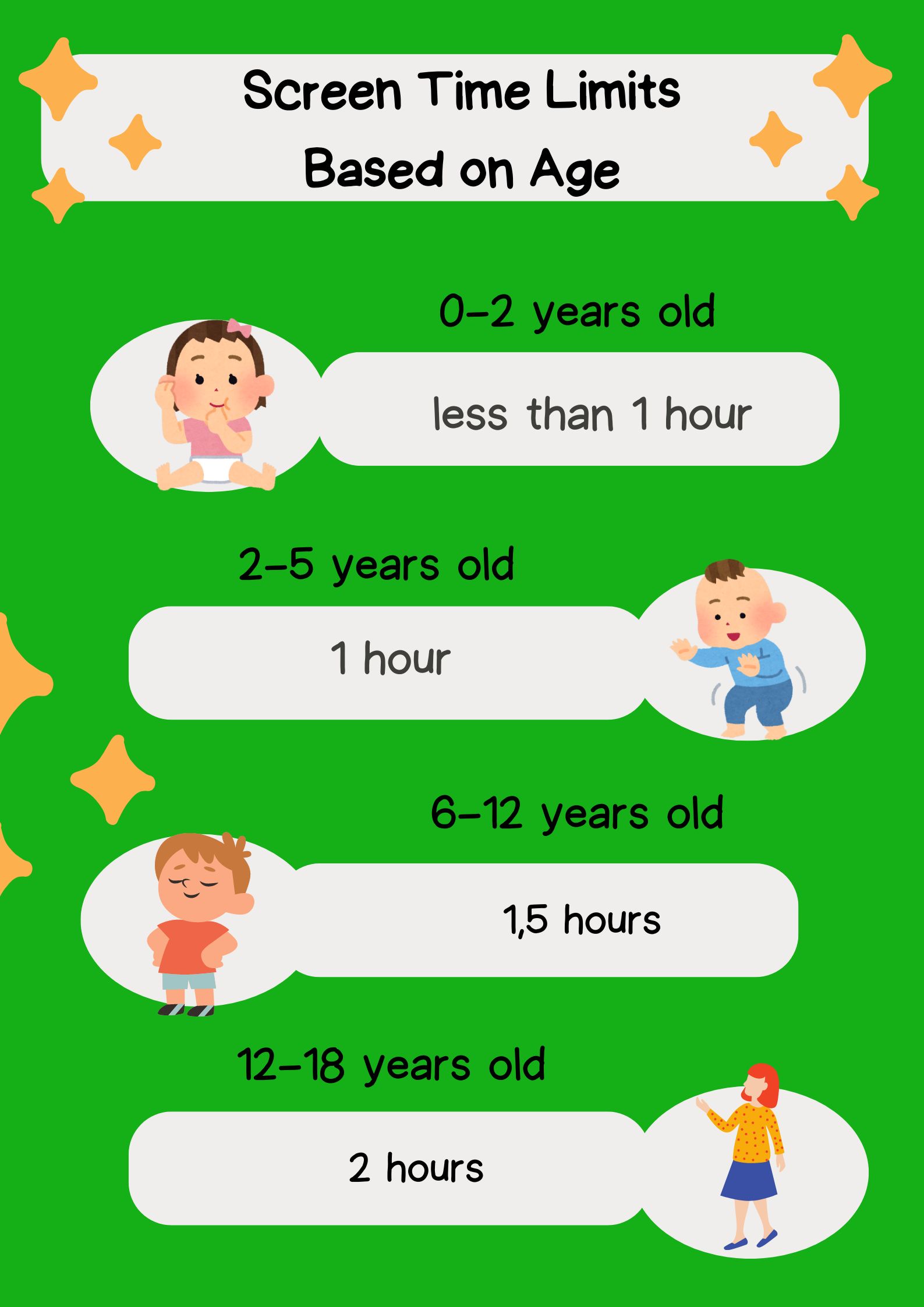
Screen Time Based on Age

Screen Time Limit Based on Age. Designed by Timedoor Academy

According to the Ministry of Health of the Republic of Indonesia, children under the age of 2 are recommended not to be given access to gadgets. If necessary, usage should not exceed 1 hour per day and must be supervised by parents. Children aged 2-5 years are recommended to have 1 hour daily. For children aged 6-12 years, it should not exceed 1.5 hours per day, and for children aged 12-18 years, it is 2 hours per day.

Parents can create a daily schedule that includes time for studying, playing outside, physical activities, and rest to help children understand the importance of balancing their time.


Give a Good Example

Children will imitate their parents’ habits. Therefore, parents must set a good example in using gadgets. Show your children that you have time limits and engage in other activities such as exercising.

Research suggests that parental behavior significantly influences children’s habits and attitudes toward technology. For example, parents can set rules not to use gadgets during dinner or family gatherings. This way, children will know there is a specific time for gadget use.


Encourage Other Positive Activities

Aktivitas untuk anak
Encourage your children to engage in various other activities, such as playing outside, drawing, exercising, or finding hobbies that match their interests and talents. Providing these activity options will help children shift their focus away from gadgets.

Additionally, encouraging children to participate in community or club activities can help them discover new interests and become more socially involved. This is effective in reducing screen time.


Educate About Gadget Use

According to BMC Psychiatry, excessive mobile device use among children is linked with various mental health outcomes like anxiety, stress, and poor educational performance. Teach your children about the consequences of excessive gadget use. Parents can explain the negative impacts and discuss with children how to use gadgets wisely. Developing digital literacy and gadget usage is important to help prevent potential gadget addiction in children. When children have the skills and understanding to use digital devices responsibly, they are less likely to become overly reliant on or addicted to them.”

This education can include information about the health risks associated with excessive gadget use. By understanding these risks, children can be more cautious when using gadgets.


Use Parental Controls

Google Family Link

In this practical era, parents do not need to worry too much about their children’s gadget activities. You can activate Parental Control features on your children’s devices. These controls can monitor the apps your children use, how long they use them, and even block inappropriate content. However, parents must also understand and respect their children’s privacy to maintain their comfort.

These controls can be accessed on various devices, such as Android, iOS, Windows, Google, and even home wifi routers. This way, you can feel more at ease by controlling your children’s activities through these features.


Involve Children in Educational Activities


Parents should take the right innovative approach in facing this digital era. If parents find it challenging to change their children’s gadget addiction to a more productive utilization, involve them in educational activities that use gadgets, such as language learning apps, coding, and programming classes, or educational games.


Those are some important points parents should consider regarding children’s gadget use. You can manage gadget addiction by utilizing technology educationally, as offered by Timedoor Academy.

Timedoor Academy offers IT Education classes for your beloved children to stay positively engaged with technology. Here, children will learn to utilize technology, including creating and developing their own games.

We offer trial classes for those who want to try it first. Register your children now and experience the benefits! Try it for free here.


Keep Reading

<strong>Is Coding Necessary for Kids? Let’s Find Out in 2025!</strong>
Is Coding Necessary for Kids? Let’s Find Out in 2025!
In today’s rapidly evolving digital era, many parents are asking, is coding necessary for kids to learn from an early age? Coding or programming is one of the skills increasingly in demand, but is it really necessary for children to learn coding? This article will explore whether coding is necessary for kids, its benefits, challenges, and how parents can start their children on the right path, especially through coding programs like those offered by Timedoor Academy. Is Coding Necessary for Kids? The question is coding necessary for kids has become more common, especially with advances in technology and digital education. Formally, coding is not yet a mandatory subject in all schools, but today’s job market and digital industries highly value tech and coding skills. Coding is the language behind almost every digital device we use today. Teaching coding early helps prepare children for future challenges that rely heavily on technology and digital innovation. So, while it may not be mandatory by regulation yet, coding is a crucial skill that should be introduced early. Benefits of Coding for Kids When considering is coding necessary for kids, it is important to understand the benefits of learning coding. Coding helps children develop logical and systematic thinking. They learn to break down big problems into smaller parts and solve them step by step. Coding also boosts creativity because children get to create digital projects such as games, animations, and apps. This makes learning coding fun and builds their confidence. Additionally, coding develops problem-solving skills and perseverance. Children need to be patient and precise to ensure their programs work correctly. These skills are valuable not only in tech but in many areas of life. Challenges in Learning Coding for Kids Even though there are many benefits, some challenges come with learning coding. This often leads parents to ask again, is coding necessary for kids, considering the learning process can be tough. Kids may struggle with abstract concepts or complex logic. Parents need to provide extra support and choose fun, age-appropriate methods so children stay engaged and don’t get frustrated. Programs like those at Timedoor Academy are designed to make coding interactive and enjoyable for kids. With the right approach, these challenges can be overcome, and children become more interested in technology. How to Start Learning Coding for Kids? If you still wonder is coding necessary for kids, the key is starting the right way. Begin with simple basics like visual block coding that’s easy to understand. Timedoor Academy offers coding classes tailored to kids’ age and skill level, from beginner to advanced. Children learn through fun projects that deepen their understanding. Timedoor Academy also provides free trial classes. These allow parents and kids to experience the learning method before fully committing. The Role of Parents in Supporting Coding Learning Parents play a crucial role in helping kids succeed in coding. They can set aside dedicated time for learning and accompany children while they work on assignments or projects. Discussing what children learn helps them feel supported and motivated. Good parent-child communication strengthens the learning process and helps kids overcome difficulties. Parents should also remind kids to balance study and rest to avoid fatigue and burnout. Conclusion: Is Coding Necessary for Kids? So, is coding necessary for kids? While coding isn’t mandatory in many schools yet, it is vital for children’s futures. Teaching coding early prepares kids for a digital workforce and develops critical thinking, creativity, and problem-solving skills. Timedoor Academy supports this by offering child-friendly, interactive, and accessible coding classes. With free trial classes available, parents and kids can try a free trial class before fully joining. Don’t wait! Register your child at Timedoor Academy and give them the chance to learn coding in a fun and effective way. With coding skills, your child will be ready to thrive in an advancing digital world full of opportunities.
<strong>10 Best Sensory Play Ideas for Kids in 2025</strong>
10 Best Sensory Play Ideas for Kids in 2025
Sensory play for kids is a powerful way to support their motor, cognitive, and emotional development. Through hands-on sensory experiences, children explore textures, colors, sounds, and smells in a fun and educational way. Many parents are now looking for sensory activities that are easy to create at home using simple materials. In this article, you’ll discover 10 of the best sensory play ideas that are simple, effective, and perfect for kids aged 2 to 6. These activities help spark creativity while allowing children to engage with their surroundings using multiple senses. 10 Best Sensory Play Ideas for Kids in 2025 1. Dry and Wet Sand Play Fill a large container with dry sand on one side and damp sand on the other. Let children dig, scoop, and build. This classic activity provides textural contrast and is a great form of sensory play for kids. 2. Glitter Bottles Combine water, glitter, and a few drops of baby oil in a clear bottle. Shake and watch the glitter move slowly. This is a calming visual tool that supports focus and mindfulness. 3. Colored Flour Bin Mix flour with different food colorings. Kids can stir, shape, and play with the textures and colors. It's a simple way to introduce creativity and fine motor skills. 4. Texture Board Attach materials like velvet, cotton, bubble wrap, and sponge to a board. Kids can explore by touching and describing the textures. This supports descriptive language and sensory curiosity. 5. Frozen Fruit Cubes Freeze fruit pieces or colored water in small molds. Children can feel and taste the cubes as they melt. This is a cold, exciting, and safe sensory experience. 6. Soapy Swirl Mats Use a waterproof mat and add soapy water. Kids can use plastic tools to swirl, cut, and push bubbles around. This offers tactile fun with minimal mess. 7. Scented Dough Create homemade dough with added scents like vanilla or mint. Let kids shape the dough while enjoying the soothing smells. It’s one of the most engaging types of sensory play for kids. 8. Mystery Smell Boxes Fill small boxes with items like coffee grounds, orange peels, or herbs. Let kids sniff and guess what's inside. This builds their sense of smell and memory. 9. Magnetic Object Play Create a station with small metal objects and let children use magnets to move them. It combines touch with basic science exploration. 10. Vegetable Mud Mix vegetable peels with water and soil in a bin. Kids can squeeze and scoop the mixture. It’s messy, fun, and encourages curiosity through texture. Tips to Maximize Sensory Play Use a variety of sensesGreat sensory play for kids should involve at least two senses, such as sight and touch or smell and hearing. Keep it safeAlways use safe, non-toxic, and age-appropriate materials. Supervise activities closely, especially for toddlers. Encourage parent interactionJoin in the activities. Your presence helps guide the play while also strengthening your bond with your child. Keep it simple to cleanUse trays or bins to contain materials and make cleanup easy. Choose washable tools and surfaces. Adjust based on your child's reactionPay attention to what your child enjoys and be flexible. Not every texture will appeal to every child, and that’s perfectly normal. Why Sensory Play Supports Growth Sensory play for kids isn’t just fun, it supports language, motor skills, and early problem-solving. It allows children to explore, test, and learn about their environment in a hands-on way. Over time, this strengthens their ability to concentrate, follow instructions, and express themselves clearly. Blending Sensory with Digital Skills Once your child is engaged in sensory play for kids, it’s a great time to introduce digital learning tools like coding. At Timedoor Academy, kids learn programming in fun and interactive ways. Coding helps build logical thinking and creativity in a digital space. Sensory activities and digital literacy together create a well-rounded foundation for your child’s future. Try a free trial class at Timedoor Academy today!
<strong>What Is Fatherless? 5 Overlooked Effects on Children in 2025</strong>
What Is Fatherless? 5 Overlooked Effects on Children in 2025
Many parents still don’t fully understand what is fatherless or how deeply it can affect a child’s development. At its core, fatherless describes a situation where a child grows up without the presence or meaningful involvement of a father figure. This isn’t limited to cases where the father is physically absent. It also includes situations where the father is emotionally unavailable or disengaged, even if he’s living under the same roof. As modern life becomes busier and family structures more complex, the number of children growing up without an engaged father figure continues to rise. Yet because there’s often a lack of awareness around what is fatherless, its impact is frequently underestimated. In reality, it can influence nearly every aspect of a child’s life — emotionally, socially, and academically. Here are five real and often overlooked effects of what is fatherless that every caregiver should be aware of: 1. Emotional and Behavioral Instability Children without consistent involvement from a father figure may struggle with emotional regulation. They can become more sensitive, withdrawn, anxious, or quick to anger. A lack of emotional guidance and security can leave children unsure of how to process big feelings. Understanding what is fatherless helps parents recognize these early signs and provide support before they grow into larger issues. 2. Low Self-Esteem and Insecurity A father’s encouragement and presence often play a huge role in a child’s sense of self-worth. When that connection is missing, children may feel unloved, unimportant, or unsure of their value. They might avoid challenges, struggle with confidence, or become overly reliant on praise from others. Recognizing what is fatherless can help caregivers provide emotional validation that children may not receive otherwise. 3. Academic Struggles Children who grow up in fatherless environments often face challenges with focus, motivation, and discipline when it comes to school. They may feel less driven to succeed or lack the encouragement they need to stay engaged. Once parents understand what is fatherless, they can step in with structure, emotional support, or even professional guidance to help children thrive in school. 4. Difficulty Building Healthy Social Skills The absence of a father figure can also impact how children interact with others. Some become overly shy and withdrawn, while others might act out or struggle with empathy and boundaries. Children learn by example, and without healthy male role models, they may find it difficult to develop strong communication and social skills. Being aware of what is fatherless helps parents and educators create more intentional opportunities for positive social learning. 5. Increased Dependence on Screens and Online Worlds When emotional support is lacking at home, children often turn to devices, social media, or online content for comfort and distraction. They may begin to prioritize digital stimulation over real-life connection, leading to isolation and overdependence on technology. This is another hidden risk within what is fatherless — one that can affect a child’s mental well-being and social development over time. What Can Parents and Caregivers Do? Acknowledging that a child may be experiencing the effects of fatherlessness is not about assigning blame. Instead, it’s the first step toward meeting their emotional needs in a more intentional way. Quality time, open communication, and consistent emotional support from other caregivers can make a powerful difference. Another way to help children build confidence and a sense of purpose is by introducing them to meaningful, skill-building activities — like learning to code. Coding encourages logical thinking, creativity, and problem solving, all of which contribute to stronger self-esteem and mental resilience. Try a Free Coding Class at Timedoor Academy Timedoor Academy offers fun, age-appropriate coding classes designed to help children explore their potential in a supportive and engaging environment. Whether they’re creating simple games or animations, children build valuable skills while developing confidence in their abilities. You can sign up for a free coding trial class and see firsthand how coding can positively shape your child’s growth — not just academically, but emotionally and socially, too. Let’s help children channel their energy into something creative, constructive, and empowering.
float button