Dec 25, 2023

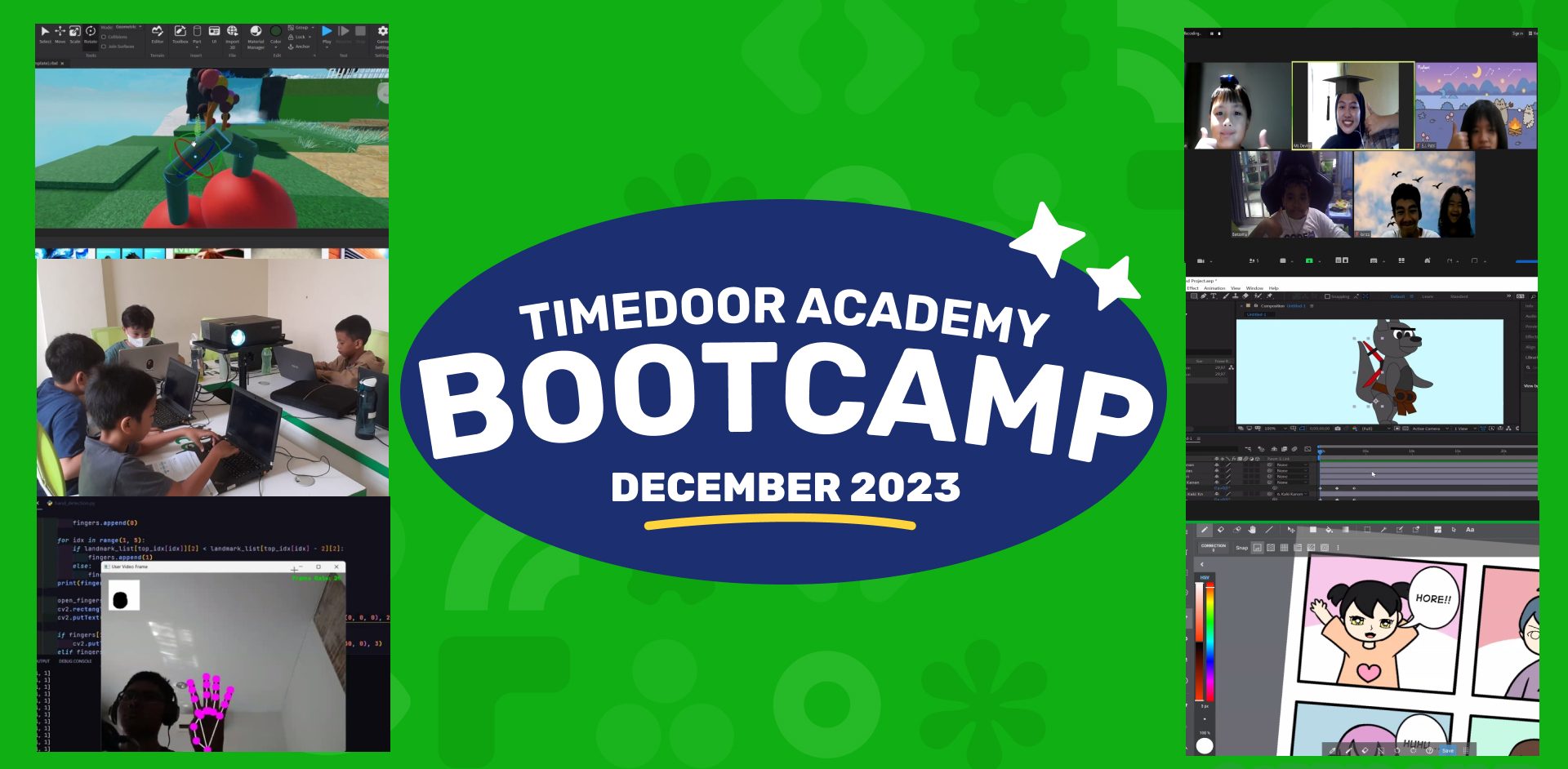
Timedoor Academy Bootcamp December 2023 Awardee Announcement

Timedoor Academy Bootcamp December 2023 Awardee Announcement image

Timedoor Academy BootCamp 2023 Batch 1 and Batch 2 was held from 11 – 22 December 2023. With more than 200++ participants from Online Classes and Offline Classes in several areas including Jakarta, Bogor, Tangerang, Bandung, Surabaya, Bali, Batam and Medan. We also launched our new programs, UI/UX Design and Internet of Thing (IOT) which were held online and offline in several regions.

Timedoor Academy holds Programming and Multimedia Design classes for 5 days with various programs that students can choose according to their interests. Coding Camp offers many programs including Game Developer, Website Developer, Python Developer, Roblox Developer, Artificial Intelligence Development, and Internet of Thing (IOT). As before, we are offers Design Camp with a learning program that focuses on children’s creativity including Making Animations, Design Branding, UI/UX Design and Comic Making.

Timedoor Academy sets a goal for students to become programmers, designers and comic artists in just 5 days by creating the best projects using the chosen platform that challenges them to be able to become digital experts in the present and the future!

Today we announced the 2 best award recipients from each program category. Award recipients consist of Best Project and Best Participant. Please check below :


JUNIOR ANIMATOR
CATEGORY PARTICIPANT’S NAME
Best Project  I Gusti Agung Gde Nathan Iswara Dwipayana
Best Participant  Luh Putu Derian Dharma
JUNIOR DEVELOPER
CATEGORY PARTICIPANT’S NAME
Best Project  Khalid izzudin
Best Participant  Darren Gavriel
JUNIOR ADVANCE GAME DEV
CATEGORY PARTICIPANT’S NAME
Best Project  Benjamin Othniel Sianturi
Best Participant  Alaric Dante Miranda
KIDS CONSTRUCT BEGINNER + WEB
CATEGORY PARTICIPANT’S NAME
Best Project  Araya Khanti Devi
Best Participant  Irdana Halwa
KIDS ROBLOX
CATEGORY PARTICIPANT’S NAME
Best Project  Dave Michael Timothy Panjaitan
Best Participant  Ryan Kenzie Tanady
KIDS PYTHON
CATEGORY PARTICIPANT’S NAME
Best Project  Laurencia Clio Setiadi
Best Participant  Maxwell Oscario Tan
KIDS IOT
CATEGORY PARTICIPANT’S NAME
Best Project  Kadek Vedhanta Asahi Wijaya
Best Participant  Dewa Gede Narayana Satria Daton Putra
KIDS COMIC
CATEGORY PARTICIPANT’S NAME
Best Project  Aiesha Naiaputri Nugroho
Best Participant  Hilwa Fathiya Qurrata’ain
TEENS PHASER
CATEGORY PARTICIPANT’S NAME
Best Project  Andrian Wurich
Best Participant  Miguel Aipassa
TEENS WEB DEVELOPER
CATEGORY PARTICIPANT’S NAME
Best Project  Keila Kusuma
Best Participant  Gilberto Rafael Effendie
TEENS APP DEVELOPER
CATEGORY PARTICIPANT’S NAME
Best Project  Raisha Afiqah Khairunnisa
Best Participant  Rafael Davin
TEENS ROBLOX
CATEGORY PARTICIPANT’S NAME
Best Project  Julio Miguel Setiawan
Best Participant  Samuel Lovenno Sadana
TEENS PYTHON
CATEGORY PARTICIPANT’S NAME
Best Project  Hendry Hermawan
Best Participant  Arka Pradipa Dwi Santoso
TEENS IOT
CATEGORY PARTICIPANT’S NAME
Best Project  Fathi Rafi Ismail Priambodo
Best Participant  Ryu Garren Siarta
 TEENS ARTIFICIAL INTELLIGENCE
CATEGORY PARTICIPANT’S NAME
Best Project  Reagan Dathan Mula
Best Participant  Cornelius Rafanala Maheswara
TEENS COMIC
CATEGORY PARTICIPANT’S NAME
Best Project  Rajwa Nurul Dzihni
Best Participant  Ida Ayu Dhama Parwati Astuti
DESIGN ANIMATION
CATEGORY PARTICIPANT’S NAME
Best Project  Emerentia Jessica Putri
Best Participant  Cedric Franklin Chandra
UI/UX Design
CATEGORY PARTICIPANT’S NAME
Best Project  Eleanora Kalyca Fayola Siregar
Best Participant  Vanessa Althea Aditya

All awardee will receive medals, exclusive T-shirts and merchandise from Timedoor Academy. Send your address to Timedoor Academy Admin to claim your prize.

Keep Reading

How to Use Figma for Kids: A Fun and Simple Digital Design Guide
In today’s digital era, graphic design has become an increasingly essential skill, even for kids. Design is not just about drawing or creating illustrations. It also helps children develop creativity, visual logic, and systematic thinking. One of the most popular and beginner-friendly design tools to introduce early on is Figma. This article will guide you on how to use Figma for kids in a fun and easy-to-follow way. Figma is a web-based design platform widely used by UI/UX professionals and graphic designers. But because of its intuitive interface and real-time collaboration features, Figma can also be a great learning tool for children, especially those curious about digital design, posters, invitations, app layouts, or even simple games. Why Kids Should Learn Digital Design Digital design is not only about aesthetics, but also about communication. Kids who learn design early tend to express ideas visually, organize information clearly, and feel more confident experimenting with their creativity. Design skills also open doors to other fields like illustration, app development, animation, and branding. By learning how to use Figma for kids, the design process becomes more engaging. They can instantly try, rearrange, and explore design elements without needing to install any additional software. What to Prepare Before Using Figma Before your child starts designing, here are some things to set up: Figma account: Create a free account at figma.com. Use a parent’s email and assist during setup. Device: A laptop or desktop with a stable internet connection works best. Simple design theme: Start with fun, easy projects like a birthday card or character illustration. Benefits of Using Figma for Kids Here are some of the main benefits of using Figma as a learning tool for kids: Enhances creativity and visual aesthetics Builds logical thinking through layout structure Boosts confidence through hands-on creation Encourages teamwork and collaboration in online settings Step-by-Step Guide: How to Use Figma for Kids Below are specific steps on how to use Figma for kids, including core features and how to guide them: 1. Introduce the Interface and Basic Tools After logging in to a Figma account, walk your child through the main elements of the workspace: Canvas: the blank area where they’ll build designs Top toolbar: includes tools like Move, Frame, Shape, and Text Left panel: shows the object structure (layers) Right panel: used to adjust color, size, position, and effects Let them freely draw circles, squares, or stars and experiment with colors. This unstructured play helps them get familiar with Figma naturally. This is also a great starting point in how to use Figma for kids in a stress-free way. 2. Start a New Project Click New Design File and let your child name it something fun like “My Poster” or “Cute Cat Project.” Then: Create a Frame using A4 size or mobile screen dimensions Add shapes via the Shape tool, then change colors on the right panel Add text with the Text Tool, and adjust font size, color, and position This step of how to use Figma for kids feels like drawing on a digital piece of paper—fun and intuitive. 3. Add Images and Illustrations To make their design more dynamic, help them insert images: Click File > Place Image and choose from your computer Or simply drag and drop into the canvas Use the Unsplash plugin to find royalty-free images directly inside Figma This makes it easier for kids to create digital greeting cards, collages, or mood boards. These small projects are practical examples of how to use Figma for kids in real-life situations. 4. Create Simple App or Game Layouts For older kids, try introducing them to basic app layout design: Use Frames sized for iPhone or Android Add titles, icons, and buttons Turn elements into Components for duplication Use Prototype mode to simulate screen transitions This is a creative and exciting way to teach design logic and basic UX thinking. It’s also a more advanced stage in how to use Figma for kids who want to go deeper. 5. Collaborate and Present Figma is perfect for collaborative learning. Kids can: Click Share to invite parents, teachers, or friends Use Presentation Mode to view their design full-screen Receive comments directly on the canvas and learn from feedback These interactions help kids learn how to present and improve their ideas. How to use Figma for kids can extend into valuable lessons on teamwork and communication. Combine with Online Design Classes To support their learning journey, consider enrolling your child in an online design course. Timedoor Academy offers kid-friendly design programs based on fun projects and personalized learning. Learning how to use Figma for kids is much easier when supported by friendly mentors and structured activities. Tips for Parents to Support Learning To make the learning process smoother, parents can: Be present during the early stages, then give room to explore Ask about their designs and encourage storytelling Avoid focusing on perfection—celebrate creativity instead Try designing together as a bonding activity Ready to Introduce the World of Design? Introducing your child to digital creativity can begin with simple tools like Figma. With the right guidance and playful approach, how to use Figma for kids becomes a fun activity that sharpens logic, builds visual confidence, and sparks interest in technology. Timedoor Academy is here to support your journey. With interactive online classes and friendly instructors, your child can learn to design with confidence. Try a free class today and help your child discover their design potential from an early age.
<strong>5 Best! Free Coding Apps for Kids You Should Try</strong>
5 Best! Free Coding Apps for Kids You Should Try
Introducing free coding apps for kids is a powerful way to build their logical thinking, creativity, and problem-solving skills from an early age. With user-friendly and kid-safe platforms, children can explore how to code, design games, animate characters, and develop mini programs without paying for expensive software. Why Should Parents Discover the 5 Best Free Coding Apps for Kids? Coding is no longer just for tech-savvy teens or college students. Even elementary school kids can begin their digital journey through colorful and interactive interfaces. Below are five top recommendations of free coding apps for kids, each offering unique features and a fun learning experience. 1. Scratch Recommended Age: 8 to 16 yearsWhy It’s Great: Uses visual blocks instead of complicated text code, which is perfect for beginners Includes a safe online community where kids can share projects Offers guided tutorials that teach them how to create animations and games Parent Tip: Help your child start with a basic animation, then let them customize characters or add sound effects to boost engagement. 2. Code.org Recommended Age: 6 to 18 yearsWhy It’s Great: Offers a complete learning path from drag-and-drop to real coding with JavaScript Features Hour of Code activities with themes like Minecraft and Frozen Has tools for parents and teachers to track learning progress Parent Tip: Encourage your child to join Hour of Code events around the world to make the experience feel exciting and social. 3. Tynker Recommended Age: 7 to 14 yearsWhy It’s Great: Game-based learning with space, robot, and arcade themes Lets kids transition from visual blocks to text-based coding with Python or JavaScript Comes with ready-made project templates to jump-start creativity Parent Tip: Use the free Learning Path before exploring premium features. Make sure your child completes one level at a time to stay focused. 4. Grasshopper Recommended Age: 10 years and upWhy It’s Great: Developed by Google to teach JavaScript in bite-sized, mobile-friendly lessons Gives instant feedback with visual explanations Tracks daily learning streaks to encourage consistent practice Parent Tip: Set a goal for 15 minutes of coding each day. Short, regular practice is more effective than longer sessions once a week. 5. Kodable Recommended Age: 5 to 10 yearsWhy It’s Great: Uses fun maze games to teach programming logic like sequencing and loops Works offline, making it a great option for travel or areas with limited internet access Offers free lesson plans for teachers that parents can also use at home Parent Tip: Ask your child to explain what they did after each game level. Talking about the process helps reinforce their understanding. How to Maximize Learning from Free Coding Apps For Kids Create a Weekly RoutineKeep learning sessions short and fun. Younger children stay more focused with shorter screen time. Celebrate Their ProjectsPrint out screenshots or let them show their work to family. This helps build pride and motivation. Support Group LearningInvite a sibling or friend to try the same app. Coding becomes more fun when kids learn together. Connect to School LessonsUse these apps to explain math or science concepts. Coding is a powerful tool that makes abstract ideas more concrete. Why Free Coding Apps For Kids Matter Learning with free coding apps for kids provides valuable skills without financial barriers. These apps allow children to: Develop logical thinking and creativity Explore digital storytelling and simple game design Learn basic programming terms and structure Build confidence with hands-on digital tools What’s Next? Upgrade to Structured Learning at Timedoor Academy After exploring free coding apps for kids, you can take your child’s skills to the next level. Timedoor Academy offers online coding courses with expert instructors, real-world projects, and a fun, guided experience that grows with your child. Sign up now for a free trial coding class at Timedoor Academy and give your child a head start in the digital age.
How to Help Kids Stay Focused While Studying at Home in 2025
Many parents struggle with children who find it hard to stay focused while studying at home. School assignments pile up, but their attention often drifts elsewhere — whether to gadgets, television, or simply daydreaming. This situation can be frustrating for parents. That is why it is important to understand how to help kids stay focused while studying with realistic and effective approaches. This article will explore the common reasons why children struggle with concentration and offer practical strategies that parents can apply at home. With simple yet targeted steps, parents can help build better study habits and support their child's focus.   Why Do Kids Struggle to Focus While Studying? Before diving into how to help kids stay focused while studying, it is essential to understand the root causes. Several common factors can affect a child's ability to concentrate: Disruptive EnvironmentNoise from the television, younger siblings playing, or constant gadget notifications can easily distract children during study time. Lack of Interest in the SubjectWhen learning materials feel boring or irrelevant, it becomes difficult for kids to stay engaged and focused. Poor Timing for StudyingForcing children to study when they are tired, hungry, or mentally drained will only make it harder for them to concentrate. Age-Appropriate Attention SpanEvery child has a different capacity for concentration, especially at a young age. Sometimes, parents expect too much in this regard. Early Habit of MultitaskingChildren who are used to playing games while watching videos or listening to music may struggle to develop the ability to focus on a single task.   Practical Ways to Help Kids Stay Focused While Studying at Home Once you understand the underlying issues, here are some practical steps on how to help kids stay focused while studying: 1. Create a Comfortable and Distraction-Free Study Space Ensure your child has a dedicated study area that is well-lit, quiet, and free from distractions like television or unnecessary gadgets. 2. Adjust Study Time to Match Their Rhythm Pay attention to when your child is most alert and ready to learn, such as after a nap or a healthy breakfast. Avoid study sessions when they are visibly tired. 3. Break Study Time into Short, Manageable Sessions Younger children are more likely to stay focused with 20 to 30-minute study sessions, followed by short breaks. This helps maintain their concentration without overwhelming them. 4. Use Interactive Learning Methods Switch from monotonous study routines to more engaging approaches. Visual aids, educational games, and hands-on activities can make learning more interesting. 5. Support Without Hovering Be present to guide your child without micromanaging. Give them space to try solving tasks on their own and step in only when they truly need help. 6. Appreciate Effort, Not Just Results Recognize and praise your child's effort to focus, no matter how small. Emphasizing the learning process rather than only the final outcome encourages a healthier attitude toward studying.   How Coding Can Help Improve Kids' Focus One effective way to help kids stay focused while studying is by introducing them to coding activities. Learning to code teaches children how to break down problems into smaller, manageable steps. This process helps develop focus, logical thinking, and patience. Coding is often presented in the form of interactive games, making it fun and engaging for children. Without realizing it, they practice maintaining concentration and structured thinking — skills that are valuable not only for school but also for everyday life.   The Key: Consistency and Patience Helping kids stay focused while studying is a gradual process. There are no instant solutions. Consistency and patience from parents are crucial in developing better learning habits. Every child learns at their own pace, so it is important for parents to adjust their approach to fit their child's personality. It is natural for children to get bored, frustrated, or easily distracted. However, with the right support and strategies, they can gradually build stronger focus without feeling pressured.   From Struggling to Focus to Becoming Independent Learners Dealing with a child who struggles to stay focused while studying is not easy. But with patience, the right approach, and continuous encouragement, parents can help their children develop better concentration skills. Creating a conducive learning environment, understanding the child's needs, and choosing engaging study methods are essential steps in this journey. In addition, activities like learning coding can serve as an effective way to train children’s focus and logical thinking. Coding teaches them to solve problems step by step and stay patient throughout the process. Timedoor Academy offers free coding trial classes for children, designed with fun and easy-to-follow methods. Enroll now and help your child become more focused and engaged in their learning journey.
float button